
{YAML Tutorial: A Quickstart Guide}
If you have ever tried to work on a DevOps project, you may have come across files with extensions .yaml or .yml.
These are known as YAML files. But what exactly are they?
YAML Ain’t Markup Language (YAML) is a simple but powerful Data Serialisation language. Over the last few years, the popularity of YAML files has steadily increased. It is similar to other previously used languages like XML and JSON.
YAML files are most commonly used in DevOps for creating automation processes or creating configuration files while working with well-known tools and technologies like Docker, Kubernetes, Ansible and many others.
Here’s what this guide will cover -
- Why YAML?
- YAML Syntax
- YAML Datatypes
- YAML Anchors
Why YAML?
Here are some of the reasons why YAML is preferred over JSON and XML while working with configuration files -
- It has simple Human-readable code, compared to JSON and XML.
- It has minimalist syntax. So, the YAML files look cleaner than XML and JSON files.
- It allows comments.
- In contrast to JSON files, quotation marks aren’t necessary while writing strings in YAML files.
- YAML uses the indentation format. Each block in JSON is differentiated using brackets, whereas YAML makes use of the indentations i.e. the number of white spaces.
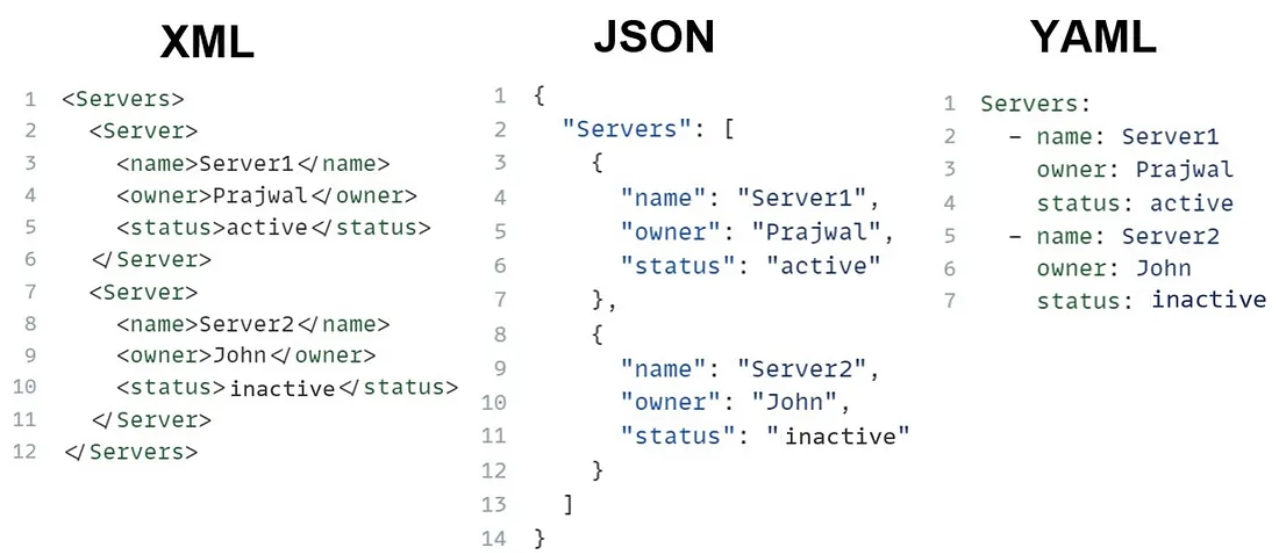
comparison of YAML with XML and JSON (image created by author)
We can see how cleaner the YAML looks as compared to JSON and XML.
That said each of the configuration languages has their advantages and disadvantages and are used accordingly in different scenarios.
YAML Syntax
Key-Value pairs -
Key-Value pairs are the building blocks of YAML. Each key is mapped to a value. The mapped value can be of any data type like a number, boolean, string, null, array or object. The key and its values are separated using a colon : and a space.
<key>: <value>Comments -
We can add comments in YAML files using #.
# This is a single line comment
students:
  - Student1
  # This is a
  # multi-line comment
  - Student2
Multi-Document support -
While writing YAML files multiple documents can be written in one single YAML file.
Each document is separated using three dashes ---. The end of the YAML file is specified with ...
---
# First document
fruit: Mango
color: Yellow
---
# Second Document
fruit: Apple
color: Red
...
# YAML file ends here
Datatypes in YAML
YAML can support all the common types like numeric values including int, float, and non-numeric values like boolean and strings.
# Numeric values
integer: 12
float: 94.34
exponential: 6.023e+23
hex: 0x45
octal: 06574
binary: 0b110101
infinity: .inf

# Non-numeric values
string: "this is a string"
boolean: False
nullValue: ~
dateTime: 2001-12-14 21:59:43.10
Implicit & Explicit Typing
Generally, the data types of the values in YAML are auto-detected, however, explicit typing is also supported. We can mention the datatype by simply including !![typename] before the value.
intValue: !!int 234.56
booleanValue: !!bool true
Strings in YAML -
Strings in YAML can be written with or without double or single quotation marks.
str1: This is a message
str2: 'This is a message'
str3: "This is a message"
Sometimes the strings may contain multiple lines. In such cases, we can make use of | or >.
message1: |
  This preserves
  the line breaks
message2: >
  The line breaks are removed
  and the string is
  considered to be one single line
Booleans in YAML -
In addition to true/false, boolean values in YAML can also be represented by on/off and yes/no or y/n or Y/N.
# Defining Booleans in YAML
active: true
empty: yes
switch: off
answer: Y
entry: n
YAML Sequences -
Sequences are similar to an array. They allow us to store multiple values under the same key. There are two ways in which we can define sequences, Block style and Inline-Flow style.
# Block style
fruits:
  - apple
  - mango
  - orange

# inline style
fruits: [apple, mango, orange]
Dictionaries in YAML -
We can represent Dictionaries in YAML as follows
student:
  name: Prajwal
  age: 20
  country: India
  college: MU
  cgpa: 9.86
We can also combine sequences and dictionaries to create an array of dictionaries, nested sequences or nested dictionaries.
# an array of dictionaries
users:
  - user1:
    username: Prajwal27
    age: 20
  - user2:
    username: JohnB123
    age: 24
YAML Anchors
Many times while writing YAML files, we might have sections that are being repeated again and again in the files. In such cases, we can use Anchors to reduce the effort of writing the same lines again.
Anchors in YAML consists of two parts -
- The Anchor (
&) - This defined the chunk of the YAML file that need to be reused. - The Alias (
*) - This is used to refer to that chunk elsewhere in the YAML file.
- apple
- &hello orange
- mango
- grapes
- *hello
- banana
- *hello
In the above example, we have used &hello before orange as an anchor, and the alias *hello to reuse it elsewhere in the file.
When the above YAML list is parsed through any YAML parser, the result will be -
- apple
- orange
- mango
- grapes
- orange
- banana
- orange
Overriding values -
Sometimes, instead of simply reusing the same block of code, we might want to change some values before reusing it. YAML supports the overriding of values that can help us in such conditions.
To add more values or to override existing ones we can use the characters <<:
favorites: &favs
  color: red
  number: 8
  fruit: apple

Person1:
  name: Prajwal
  favorites: *favs

Person2:
  name: John
  <<: *favs
  fruit: mango
In Person1, the entire favorites object will be reused exactly the same, whereas, in Person2 the values of color and number will be copied as it is but the value of fruit will be changed from apple to mango.
These were some of the most commonly used concepts that we need to understand to start working with YAML files. Once we are familiar with the above topics, we can start creating and using various configuration files for our projects and applications using our favourite tools and technologies.
Thank you for reading! Happy Learning!!!